Tatkal day can feel like you’re standing on a crowded platform, eyes on the clock, hoping the right train pulls in at the right time. The page loads. Your heart thumps. You type the CAPTCHA. You pray the payment goes through. In 2025, demand is higher than ever—festival travel, sudden work trips, and a limited Tatkal quota mean seats can disappear in seconds. Still, with the right setup and a calm plan, you can turn the chaos into a clean, two-minute routine.
This guide shows you how. We’ll slow things down, explain what’s happening on screen, and give you a step-by-step method you can follow without stress. Think of it like a boarding announcement you can actually trust.
Tatkal in Plain Words: What It Is and Why It’s Tough
- What it is: Tatkal is a special quota that opens one day before the journey date. It’s meant for urgent travel.
- When it opens:
- AC classes: 10:00 AM (IST)
- Non-AC (Sleeper/2S): 11:00 AM (IST)
- How many seats: A small percentage of seats in each train are set aside for Tatkal. That’s why they vanish fast.
- How it works: You pay an extra Tatkal charge. You either get a confirmed ticket or you don’t book. There’s no new waitlist created at checkout for pure Tatkal.
Why it feels like a race: At 10:00 or 11:00, thousands of people press “Search” together. Servers get busy, pages lag, and one slow step (like a mistaken CAPTCHA or a payment delay) can push you out.
The 2025 Reality: What’s Different Now
- Aadhaar-verified accounts get priority during the first, most valuable minutes.
- Agents have stricter limits in those minutes.
- UPI is fastest for payments at rush time.
- No fresh waitlist under pure Tatkal—confirm or try another train.
This makes the system fairer, but it also raises the bar for preparation. The good part: once your account is set up and you know the flow, it’s actually simpler than it looks.
The Calm Plan: What Success Looks Like From Your Chair
Picture the scene at home. You’re at a desk with steady internet. A glass of water at hand. Laptop open, phone by your side. You’re logged in five minutes early. Your search is ready. When the clock hits 10:00:00 AM, you click once, choose the first train with availability, let the saved passenger details fill themselves, type the CAPTCHA cleanly, pay with UPI, and watch the confirmation screen appear. That’s it. No drama. Two minutes, start to finish.
Let’s build that moment step by step.
Set Yourself Up 24–48 Hours Before (this removes 80% of the stress)
Make your IRCTC account “Tatkal-ready”
- Verify Aadhaar in your profile so you’re not locked out during the crucial first minutes.
- Save passenger profiles (names, gender, age, ID type/number) for everyone who travels with you often—up to 4 per booking.
- Set berth preference in each saved passenger (e.g., “Lower Berth” for seniors).
- Turn on email and SMS alerts for quick confirmations.
Prepare fast payments
- Add UPI first. Keep one backup method ready (another UPI or a card).
- Do a tiny test payment a day before (on any small IRCTC add-on or wallet top-up) so you know nothing blocks you on the big day.
Sort your devices and internet
- Primary device: Laptop/desktop with stable broadband or strong 5G.
- Backup device: Phone with the official app ready.
- Browser: Chrome/Edge. Clear cache. Keep an incognito tab handy for emergencies.
- Clock: Sync your time. Set alarms for 9:59:45 and 10:59:45.
Do a practice lap
- The day before, try a dry run on a normal train. Go till the payment page. Learn the buttons and the order of steps. The real day will feel familiar.
The 5 Minutes Before Opening (how to stand at the “start line”)
At 9:55–9:57 AM (for AC) / 10:55–10:57 AM (for Sleeper/2S):
- Log in on your laptop.
- Open one incognito tab with the same login ready (backup).
- On your phone, open the official app and keep it on the search screen (second backup).
- Fill From, To, Date (tomorrow), and Class.
- Set Tatkal as the quota filter.
- Keep your UPI app unlocked or Face/Touch ID ready.
- Ask a family member to watch for OTP and read it to you if needed.
You’re now quiet, settled, and focused. That calm saves seconds later.
Booking Flow: What to Click, What to Ignore, and When to Breathe
At 10:00:00 AM (AC) / 11:00:00 AM (Sleeper/2S):
- Hit Search. Don’t double-click. Be patient for one second.
- On the results page, pick the first train that shows Tatkal availability for your class. Don’t compare too long.
- Click Book Now.
- Select saved passengers (or they auto-fill). Check age and ID quickly.
- CAPTCHA: Type slowly and correctly. One clean attempt is faster than three rushed errors.
- Payment: Choose UPI. Approve the request on your UPI app at once.
- Processing: Hands off the keyboard. Don’t refresh. Let it finish.
- Confirmation: You’ll see the success screen. Save the PNR and download the PDF.
If availability shows “0” or disappears while you’re on the form, don’t stare at it. Go back to results and immediately try the next train or class. The window moves fast—so should you.
Tiny Speed Boosters
- Saved passengers = no typing names and IDs.
- UPI default = fastest at rush minutes.
- Incognito tab = clean session if the main tab jams.
- No heavy filters at search time (coach, exact berth). Those are luxuries, not Tatkal basics.
- Short, clean names in saved passengers—remove extra spaces and dots.
- Autofill on for address and contact fields.
- Don’t bounce tabs once you’re in the flow.
- Don’t over-scroll trains. Pick the first with seats.
- Earphones if someone’s reading OTP to you.
- UPI app on the home screen for quick approve.
- Stay steady on CAPTCHA. It’s okay to take two seconds more.
- Desktop first, app second. App is a backup, not your main.
- Keep your mouse close to the “Book Now” and “Pay” buttons. No long pointer trips.
- Know your class codes (2S, SL, CC, 3A, 2A, 1A). You’ll read screens faster.
When the Direct Train Won’t Cooperate: Route Tricks That Work
- Via a junction:
If Delhi → Mumbai is dry, try Delhi → Kota and Kota → Mumbai. Two confirmed legs beat one failed direct booking. - Nearby stations:
Search from a nearby origin or nearby destination (Thane vs. CSMT, Tambaram vs. Egmore). Different stations sometimes hold different seat pools. - Class hop:
If 3A is gone, try CC (day train) or 2A if budget allows. You can swap berths with co-passengers later if needed. - Reverse logic:
Board a through-train that passes your station with seats from the previous major station. You travel a few extra stops but you secure a berth.
These tricks take a minute to switch to. Keep one ready in your head before 10:00/11:00
Lifelines: Premium Tatkal, Vikalp, UTS, and Counters
- Premium Tatkal (PT):
Higher fare, better odds. If standard Tatkal fails, PT on the same train can still save the day. - Vikalp:
If you’re flexible about the exact train but not the date, opt into Vikalp. The system can move you to an alternate train when a seat opens. - UTS (unreserved mobile ticket):
For short/medium must-travel trips, UTS gets you moving quickly, especially on day routes. - Counters:
Right after online Tatkal rush, some counters sometimes show a stray seat due to sync delays. If you’re close to a big station, it’s worth a quick try.
If Something Breaks: Calm Fixes for Common Snags
Aadhaar OTP missing:
- Hit resend after 30–60 seconds.
- Make sure your Aadhaar has your current mobile. If not, update well before Tatkal day.
- If nothing works, try after the Aadhaar-priority minutes (odds are lower, but it’s still a try).
Payment fails at the end:
- Don’t panic. Note any transaction ID.
- Switch to backup UPI or your card.
- If money is debited but the ticket isn’t issued, refunds usually auto-reverse. Keep the reference.
Website or app crash:
- Use your incognito tab.
- Or switch to the app for the next attempt.
- Refresh only when a page is truly stuck, not during payment.
CAPTCHA trouble:
- Breathe. Read carefully. If there’s an audio option and you need it, use it.
- One correct attempt beats three rushed errors.
Family, Seniors, and Kids: Make Booking Kinder
- Save every family member as a passenger with the right ID and age.
- For seniors, set Lower Berth preference in the saved profile.
- With small children, don’t try to perfect coach positions at booking time. Get confirmed first. On the train, politely ask the TTE or fellow passengers—most people help families.
A Realistic Example
Goal: Family of four, Pune → Jaipur tomorrow, prefer 3A.
Plan:
- Aadhaar verified last week.
- All four passengers saved with IDs.
- UPI tested and working.
- At 9:57, laptop logged in; phone app open as backup.
- At 10:00:00, search → first 3A train with Tatkal seats → Book Now.
- Passengers auto-filled → CAPTCHA clean → UPI approve.
- Confirmation in under 90 seconds.
Backup ready:
- If 3A failed: try CC day train + short hotel near station at arrival.
- If that failed: two pairs in Sleeper (still same day arrival).
- If everything failed: via-junction through Sawai Madhopur.
They didn’t need Plan B. But simply having it kept them calm.
Handy Checklists (save these)
Tatkal Day
- Aadhaar verified
- Passengers saved with IDs
- UPI ready + backup
- Laptop + phone
- Stable net + power bank
- Alarms set
- Direct route + one backup route
- Calm mindset
After Booking
- Save PDF + PNR
- Check coach and berth
- Keep ID proofs ready
- Turn on delay alerts in your live-status app
Premium Tatkal vs Regular Tatkal: When to Switch (and how to decide in seconds)
Regular Tatkal opens first and costs less. Premium Tatkal (PT) costs more but has better odds once regular seats vanish.
How to decide quickly
- If your first regular Tatkal attempt fails and the same train offers PT seats, switch to PT immediately if:
- You must travel on that date; or
- You value arrival time (meeting, exam, medical, family event); or
- Other trains have poor timings or long routes.
- If budget is tight and another train on the route still shows regular Tatkal in your class, try that first, then PT as the last resort.
Tip: Keep one extra search tab open filtered to PT for your preferred train. If regular fails, you’re one click away.
Popular Corridors: Ready-Made Route Playbooks
These examples show how to think under pressure. Adjust stations and trains to your reality.
Delhi ↔ Mumbai (overnight lifeline)
- First shot: 2A/3A on a fast overnight train.
- If it fails:
- Try CC on a fast day train if arrival time still works.
- Try PT on the same overnight.
- Via-junction: Delhi → Kota, Kota → Mumbai (two legs).
- Why it works: Kota often has usable connection options; two confirmed legs beat zero.
Chennai ↔ Bengaluru (high-demand business route)
- First shot: 3A/2A on a late evening or early morning train.
- If it fails:
- Check CC for the same day (daytime arrival is fine here).
- Go to PT on your first choice.
- Nearby station trick: Try Tambaram instead of Egmore; Yeshwantpur instead of KSR Bengaluru.
Kolkata ↔ Delhi (long stretch with options)
- First shot: 3A/2A on a known fast train.
- If it fails:
- PT on the same train.
- Via-junction: Try Varanasi or Kanpur split (two legs).
- Different class: If day travel suits, CC to an intermediate and then connect.
Mumbai ↔ Goa (seasonal crunch)
- First shot: 3A/2A on overnight Konkan route.
- If it fails:
- PT immediately (holiday seasons sell out).
- Nearby station: Try Karmali vs. Madgaon or vice-versa.
- Via-junction: Panvel split sometimes opens windows.
With these playbooks, you never freeze on the “No seats” screen. You already know your next move.
Group Strategy: How to Book 4 Seats Without Panic
- Keep all 4 as saved passengers with correct IDs.
- One booking for 4 is ideal. If seats are low, split into 2+2 across two attempts (but only if you’re quick and confident).
- If you end up with separate coaches, stay calm. On board, politely ask co-passengers for swaps, especially if you’re managing kids or seniors. Most families understand and help.
Coach etiquette for swaps:
- Be polite and brief.
- Offer like-for-like (lower for lower if possible).
- Don’t block the aisle—step to the side while you talk.
- Accept a “no” gracefully and try the TTE.
Deep Troubleshooting: When the System Pushes Back
Repeated payment fails
- Switch to another UPI handle (BHIM often clears quickest).
- Try your backup card only if UPI fails twice.
- Avoid switching to net banking in peak minutes—it’s slower.
- If money debits but no ticket appears, don’t retry the same path blindly. Note the reference. It usually auto-reverses.
Account lockouts
- Too many failed logins or wrong CAPTCHAs can lock you.
- Wait a few minutes. Don’t keep hammering the login.
- If you’re mid-rush, use the app on your phone for a fresh session while the desktop cools off.
Slow or frozen pages
- Use your incognito tab.
- If results take long, don’t refresh during payment; refresh only on list pages.
- If everything crawls, switch to Premium Tatkal or another train rather than fighting the same crowded path.
Aadhaar OTP loop
- Check your signal.
- Ask a family member to read the OTP aloud so you don’t break your flow.
- If OTPs are delayed, don’t burn your first minutes; use the non-priority window later as a fallback or try PT.
After Booking: Make Boarding Easy and the Ride Comfortable
Know your coach position
- Once you have your coach and berth, check coach position boards at the station or ask staff. It saves last-second sprints.
Pack for Tatkal reality
- Light bag that slides under the berth or fits the overhead rack.
- Cable lock for larger suitcases.
- Water + simple snacks so hunger doesn’t force you to wander.
Night travel safety
- Keep valuables in a small sling close to your body.
- If you’re traveling solo at night, pick a berth closer to families when possible.
- Keep the coach attendant’s number if provided and note your coach and berth on your phone’s lock screen.
Food and hygiene
- Order food via e-catering if the train has decent options, or carry your basics (sandwiches, fruits, biscuits).
- Keep wet wipes and sanitizer handy.
- If you’re sensitive about washrooms, board early to settle your luggage and freshen up before the coach gets crowded.
After the Journey: Refunds, Invoices, and Learnings
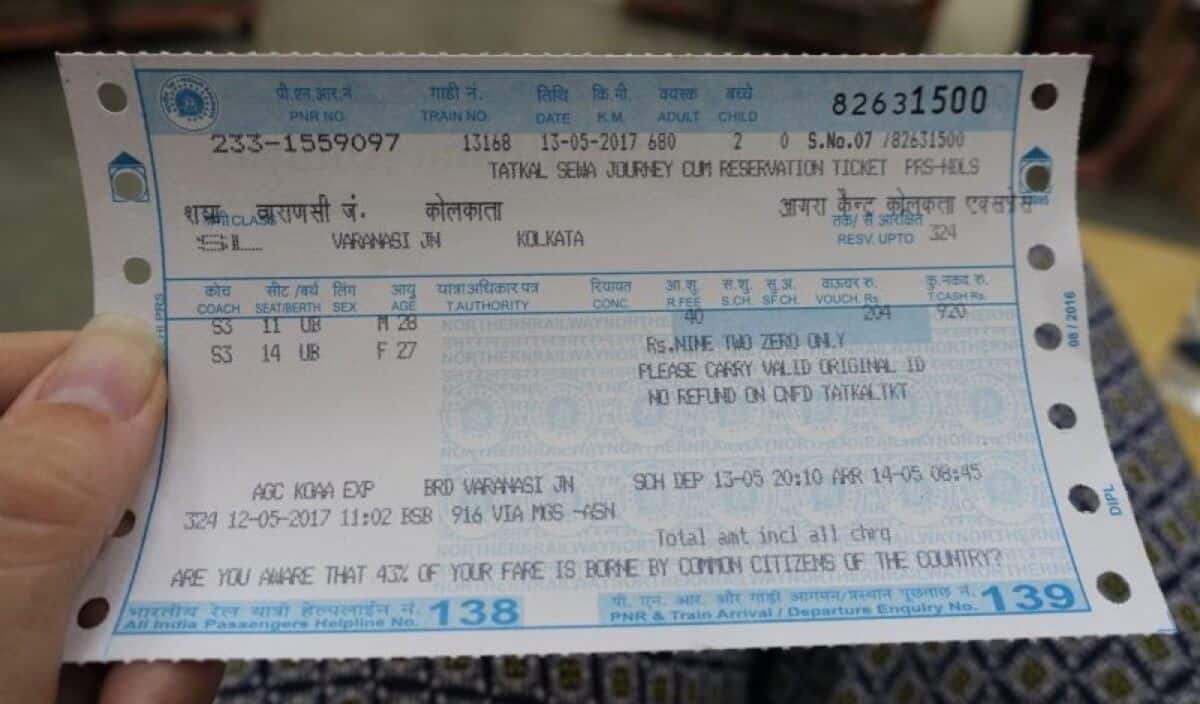
- Refunds for failed payments or canceled tickets usually auto-process. Keep your transaction reference numbers.
- If you need GST invoice for work trips, download it from your IRCTC profile post-journey.
- Make a quick note: what slowed you down this time? Fix that for the next run (e.g., “CAPTCHA cost me 30 seconds—practice it,” or “UPI app was buried—move it to home screen”).
A Calm, Real-World Walkthrough
Example: You need AC 3-tier tomorrow, Jaipur → Lucknow.
- The night before: Aadhaar verified, passengers saved, UPI tested. Two searches saved: direct train, and a split via Kanpur.
- 9:57 AM: Laptop logged in, results pre-filled with Tatkal; incognito tab as backup; phone app open.
- 10:00:00 AM: Search → first train with 3A Tatkal seats → Book Now.
- Passengers auto-fill → read CAPTCHA carefully → UPI approve.
- Confirmation lands.
- If it hadn’t: you would have tried Premium Tatkal on the same train, then your Kanpur split plan. No panic, just the next move.
That’s all Tatkal is: a calm sequence, practiced once or twice, then done on the day without drama.
Big, Plain-English FAQ
Q. I don’t have Aadhaar. Can I still try Tatkal?
Yes, but the first priority window favors Aadhaar-verified users. You can try after that or use PT, counters, or a split route.
Q. Can I book for 5 people?
One Tatkal booking allows up to 4 passengers. For 5, split into two bookings (3+2). Move fast and keep both sets of details saved.
Q. What if I need a lower berth for medical reasons?
Select Lower Berth in the saved profile. If you don’t get it, request a swap politely on board, or ask the TTE with your medical proof.
Q. Is UPI safe?
Yes. It’s also the fastest in peak minutes. Have one backup ready.
Q. My ticket shows RAC after booking. Is that normal in Tatkal?
Pure Tatkal is confirm-or-nothing. If you see RAC in a mixed scenario, keep an eye on promotions to full berth before charting. If unsure, track your PNR in a live-status app.
Q. Are refunds automatic if payment fails?
Usually yes. Save transaction IDs and give it a short window. If delayed, raise a case from your IRCTC account.
Q. Can I use a VPN for better speed?
Focus on a stable connection instead. Don’t add complexity under time pressure.
Q. Is Premium Tatkal always worth it?
When you must travel that day, yes. It trades money for certainty. If you have other trains with regular Tatkal open, try those first.
Q. What about minors?
Add them as saved passengers with the correct age. Carry age proof if the child looks older than stated.
Q. Can I carry extra bags if I booked last minute?
Follow standard luggage rules. Keep it compact and lock larger bags. Tatkal doesn’t change baggage limits.
The Descriptive, One-Screen Cheat Sheet (paste this near your monitor)
Before the day
- Verify Aadhaar → Save passengers → Test UPI → Decide Plan B (another train, another class, or a via-junction).
5 minutes to go
- Log in on laptop → Open incognito backup → Phone app ready → Pre-fill search → UPI app on the home screen.
At 10:00/11:00
- Search → Pick first train with seats → Book Now → Auto-fill passengers → Clean CAPTCHA → UPI pay → Save PNR.
If fail
- Try next train/class → Premium Tatkal → Route split via junction → Counters/UTS if needed.
After
- Save ticket → Check coach/berth → Pack light → Board calm → Ask politely for swaps if family seats are split.
Final Word: You’ve Got This
Tatkal looks scary from the outside because it’s fast and unforgiving. But once you know the order of clicks and prepare your account, it becomes a simple routine. Two quiet minutes at your desk can save a day’s worth of stress.
Set up today. Practice once. On the real day, follow your checklist and move with purpose. If your first try fails, don’t freeze—switch to your backup in seconds. That’s how you win Tatkal in 2025: not by luck, but by a calm, repeatable method.
Safe travels—and may your payment screen spin only long enough to deliver a confirmed PNR.
Suggested Articles:
- Check Tatkal Train Ticket Cancellation Rules – 2025 Updated Guide
- Experience the Valley Queen Train Ride – Discover Rajasthan’s Hidden Beauty
- Claim Your Train Ticket Refund Easily – Step-by-Step Guide for Travelers
- Book Train Tickets Online in India – Quick & Easy Guide for 2025
- Recover Lost Items on Indian Trains – Simple Lost & Found Process Explained